
Generate cURL/Python Code and Export OpenAPI
Captured requests are not just for looking at, they can become deliverables directly: one request turns into runnable code (5 languages) with a single click, a whole session is merged into a proper API spec (OpenAPI), or it exports to the universal HAR interchange format. Everything comes straight from real captures: no copying by hand, no writing from scratch. Sessions captured elsewhere can also be imported and analyzed here.
1. Generate Code: turn one request into runnable code
Section titled “1. Generate Code: turn one request into runnable code”Captured a request you want to reproduce or share? Turn it into ready-to-run code with one click, then paste it into a terminal, drop it into a project, or send it to a colleague.
5 forms, switch language to regenerate instantly, copy with one click:
- cURL (paste into a terminal and it runs)
- Python
- JavaScript
- Go
- OkHttp (Java / Kotlin)
The generated code is complete: request method, URL, all headers, and the body. Headers keep their original order and any duplicates, preserving ordering and repeated entries exactly, so what runs faithfully matches the real request, ready to use as-is.
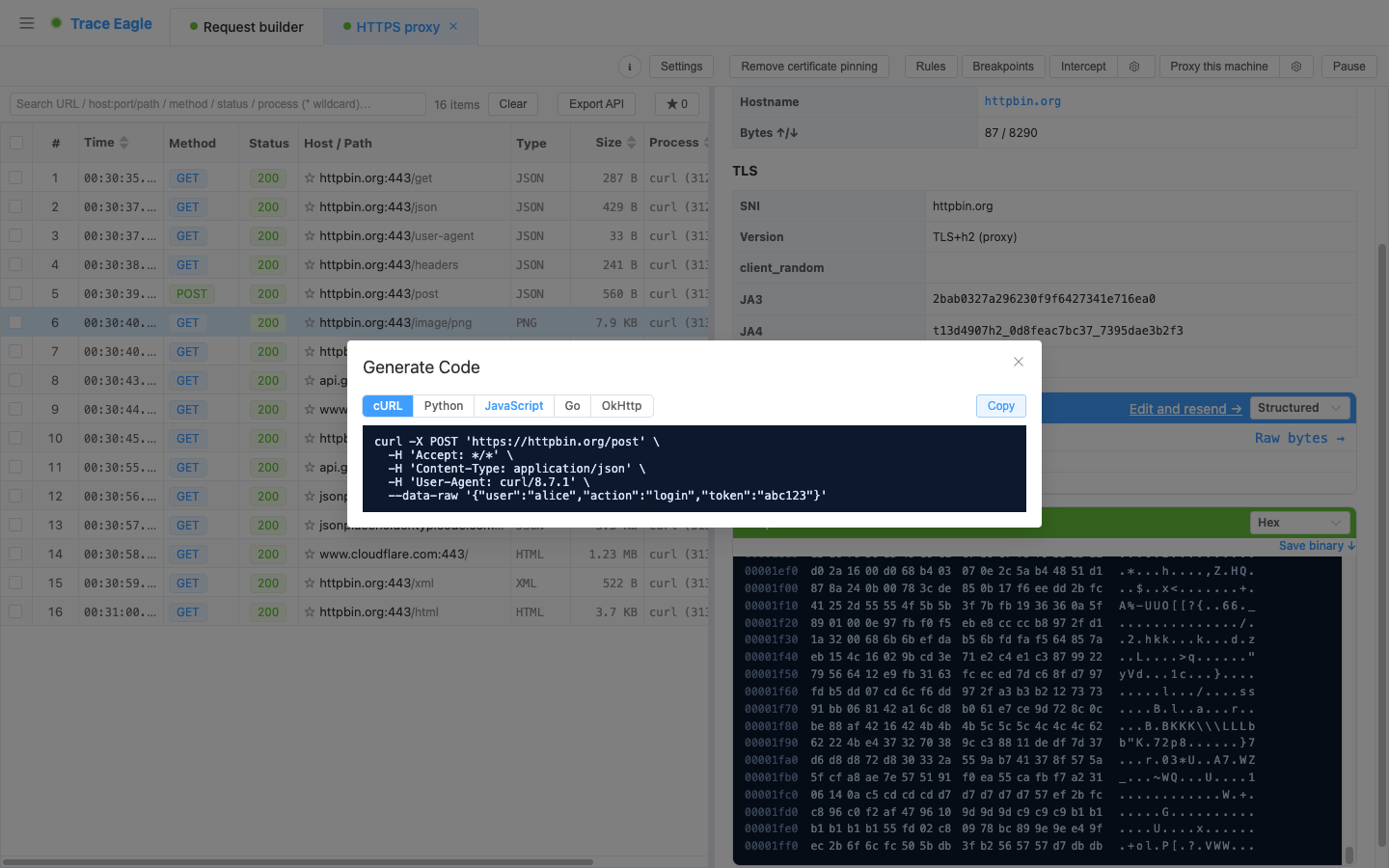
Ordinary tools often reorder and deduplicate headers when generating code, so reproduction drifts from the original; here they are preserved exactly, so what runs matches the real request.
Where to generate from
- Capture list: right-click any request, then “Generate code…”.
- Composer: after tuning a request in Compose and Replay, click “Generate code”.
When to use: reproduce a real captured request into a script or project; export a request as code after getting it working in the composer, then keep developing; share a single request with a colleague (anyone can run a cURL line).
2. Export an API Spec: turn a session into OpenAPI
Section titled “2. Export an API Spec: turn a session into OpenAPI”Captured a stretch of API traffic and want a proper spec? It organizes these requests automatically, merges them into an endpoint list, and generates an OpenAPI document with one click, no writing by hand.
- Analyze first, then export: it detects endpoints automatically from the current session and lists them for you to check, so you export only what you pick and avoid noise. The list shows each endpoint’s method, path, occurrence count, and observed status codes directly, giving you a clear picture at a glance.
- Auto-merge paths: it templatizes paths with concrete IDs, for example
/users/123becomes/users/{id}, merging multiple requests to the same endpoint into one. - Auto-infer structure: it merges the JSON structure of requests / responses, groups responses by status code, and organizes path variables into parameters.
- Produces standard OpenAPI 3.0: copy or download it, then import it into any OpenAPI-compatible tool to keep working.
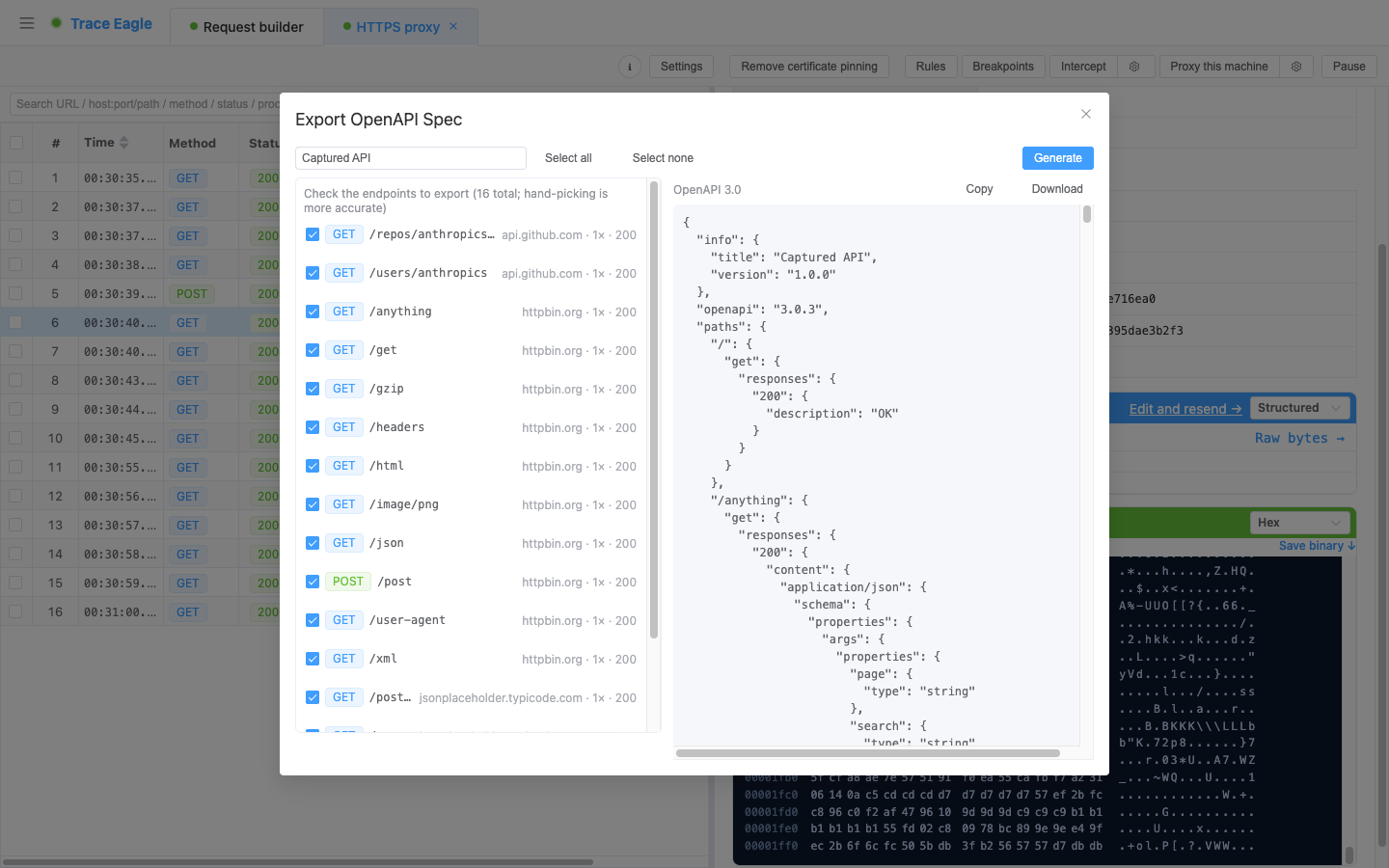
When to use: after capturing API traffic, quickly produce a deliverable, importable OpenAPI spec; analysis work, integrating with third-party APIs, filling in docs for the backend team, or building test cases for QA.
3. Import and Export: interoperate with other tools
Section titled “3. Import and Export: interoperate with other tools”Captured traffic is not locked in, and traffic captured elsewhere can be pulled in. A single standard session interchange format bridges both directions:
- Export HAR: export a whole capture to a standard HAR 1.2 file with one click, for delivery, archiving, or handing off to another tool for further analysis.
- Import sessions captured by others: import external capture session files (HAR 1.2,
.pcap/.pcapng, and session files exported by common capture tools), so packets someone else captured can be pulled in to view, compare, and export.
When to use: bring in traffic captured in production, by a colleague, or by other tools, and keep analyzing it here with the decoders, host profiles, and request comparison; or export a stretch of traffic captured here into a universal format for delivery.
Back to Proxy Capture · Related: Compose and Replay · Inspect and Decode